Note
Go to the end to download the full example code.
Dataset basics
Load and prepare an example dataset:
# Author: Christian Brodbeck <christianbrodbeck@nyu.edu>
from eelbrain import *
import numpy
import pandas


df = pandas.read_csv('https://vincentarelbundock.github.io/Rdatasets/csv/psych/Tal_Or.csv')
data = Dataset.from_dataframe(df)
data['cond'] = data['cond'].as_factor({0: 'low', 1: 'high'})
data['gender'] = data['gender'].as_factor({1: 'male', 2: 'female'})
Inspecting datasets
The whole dataset can be displayed like any variable in iPython (in a plain text environment, use print(data)).
For larger datasets it can be more convenient to print only the first few cases…
… or a summary of variables:
Individual rows and columns can be retrieved with common indexing:
data[10:15]
data[2]
{'rownames': 3, 'cond': 'high', 'pmi': 5.5, 'import_': 6, 'reaction': 5.0, 'gender': 'male', 'age': 26.0}
data['age']
Var([51, 40, 26, 21, 27, 25, 23, 25, 22, 24, 22, 21, 23, 21, 22, 23, 23, 23, 22, 23, 22, 19.5, 61, 25, 23, 60, 22, 23, 22, 23, 25, 22, 23, 22, 25, 24, 24, 29, 24, 18, 23, 21, 24, 26, 24, 22, 21, 26, 24, 27, 26, 24, 24, 26, 24, 22, 23, 24, 24, 25, 23, 23, 23, 24, 18, 23, 25, 24, 23, 23, 24, 22, 24, 25, 22, 22, 23, 25, 23, 23, 24, 21, 23, 21, 23, 19, 25, 23, 22, 19, 23, 24, 32, 27, 25, 24, 23, 28, 24, 24, ... (N=123)], name='age')
Using datasets in functions
Datasets collect information describing the same cases (rows) on different variables (columns).
This can simplify calling functions that combine information from multiple columns.
Columns can be supplied as strings, and the dataset in the data parameter:
p = plot.Scatter('pmi', 'age', 'gender', data=data, w=3, legend=(.65, .2), alpha=.4)
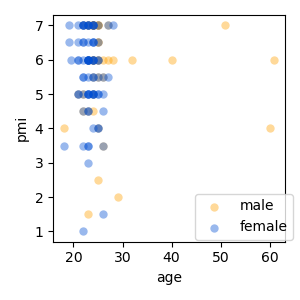
These strings cannot only be keys, but they can be Python code that can be evaluated in the dataset. For example, if this is possible:
data.eval('age < 40') # equivalent to `data['age'] < 40`
array([False, False,  True,  True,  True,  True,  True,  True,  True,
        True,  True,  True,  True,  True,  True,  True,  True,  True,
        True,  True,  True,  True, False,  True,  True, False,  True,
        True,  True,  True,  True,  True,  True,  True,  True,  True,
        True,  True,  True,  True,  True,  True,  True,  True,  True,
        True,  True,  True,  True,  True,  True,  True,  True,  True,
        True,  True,  True,  True,  True,  True,  True,  True,  True,
        True,  True,  True,  True,  True,  True,  True,  True,  True,
        True,  True,  True,  True,  True,  True,  True,  True,  True,
        True,  True,  True,  True,  True,  True,  True,  True,  True,
        True,  True,  True,  True,  True,  True,  True,  True,  True,
        True,  True,  True,  True,  True,  True,  True,  True,  True,
        True,  True,  True,  True,  True,  True,  True,  True,  True,
        True,  True,  True,  True,  True,  True])
Then, this can be used directly for plotting:
p = plot.Scatter('pmi', 'age', 'gender', sub="age < 40", data=data, w=3, legend=(.65, .4), alpha=.4)
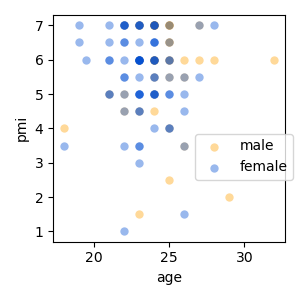
As in other cases, % is used to specify interaction between categorial variables:
p = plot.Barplot('age', 'cond % gender', data=data, w=3)
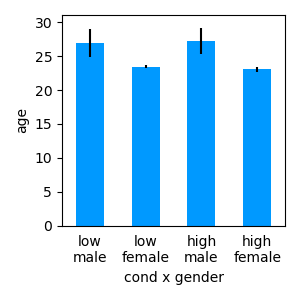
And * expands to main effects plus interaction:
Constructing datasets
While datasets can be imported from external data sources, it is also often convenient to store new data in a table on the fly.
A dataset can be constructed column by column, by adding one variable after another:
# initialize an empty Dataset:
ds = Dataset()
# numeric values are added as Var object:
ds['y'] = Var(numpy.random.normal(0, 1, 6))
# categorical data as represented in Factors:
ds['a'] = Factor(['a', 'b', 'c'], repeat=2)
# A variable that's equal in all cases can be assigned quickly:
ds[:, 'z'] = 0.
# check the result:
ds
An alternative way of constructing a dataset is case by case (i.e., row by row):